
PS-Statistik Pro – Datenschutzfreundliche Besucherstatistik für PrestaShop (ohne Cookies & externe Tracker)
  • PS-Statistik Pro – Datenschutzfreundliche Besucherstatistik für PrestaShop (ohne Cookies & externe Tracker)
  • PS-Statistik Pro – Besucherstatistik ohne Cookies für PrestaShop 1.7–9.x | PluginFabrik
  • PS-Statistik Pro – Besucherstatistik ohne Cookies für PrestaShop 1.7–9.x | PluginFabrik
  • PS-Statistik Pro – Besucherstatistik ohne Cookies für PrestaShop 1.7–9.x | PluginFabrik
  • PS-Statistik Pro – Besucherstatistik ohne Cookies für PrestaShop 1.7–9.x | PluginFabrik
  • PS-Statistik Pro – Besucherstatistik ohne Cookies für PrestaShop 1.7–9.x | PluginFabrik
  • PS-Statistik Pro – Besucherstatistik ohne Cookies für PrestaShop 1.7–9.x | PluginFabrik

PS-Statistik Pro – Datenschutzfreundliche Besucherstatistik für PrestaShop (ohne Cookies & externe Tracker)

€25.17
rating No review at the moment

PS-Statistik Pro ist ein schlankes, datenschutzfreundliches Statistik-Modul für PrestaShop 1.7 – 9.x. Es erfasst Seitenaufrufe direkt im Shop – ohne Cookies, ohne externe Tracker und ohne personenbezogene Daten – und stellt dir die wichtigsten Kennzahlen übersichtlich im PrestaShop-Dashboard bereit.

Quantity

  Sicherheit & Datenschutz

SSL-verschlüsselte Zahlungen und Shop! Keine Weitergabe Ihrer Daten an Dritte!

  Lieferung

Lieferung erfolgt via Download nach Zahlungseingang!

PS-Statistik Pro – Datenschutzfreundliche Besucherstatistik für PrestaShop (ohne Cookies & externe Tracker)

PS-Statistics Pro is a lean, privacy-friendly analytics module for PrestaShop 1.7 – 9.x. It records page views directly inside your shop – without cookies, without external trackers, and without personal data – and shows the most important metrics clearly inside the PrestaShop dashboard.

PS-Statistics Pro – Visitor Analytics directly in the PrestaShop Dashboard

PS-Statistics Pro is a lightweight statistics module for PrestaShop that records front-office page views on your own server – no external services, no cookies, and no personal data. Perfect for merchants who want to monitor traffic without running a complex tracking stack.

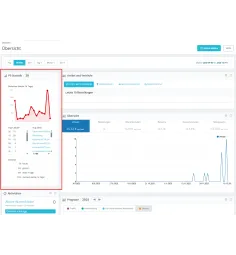
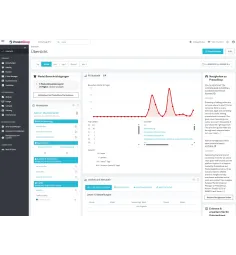
The module integrates seamlessly into the PrestaShop dashboard and provides a compact widget with key metrics such as visitors per day, top pages/URLs, top countries, and aggregated totals for selected time ranges. Technical requests, bots, admin/system routes and similar noise can be filtered so you only see meaningful shop traffic.


Why PS-Statistics Pro?

  • No tracking cookies – the module does not set analytics cookies.
  • No external service required (e.g., Google Analytics or Matomo).
  • Privacy-first and easy to read – perfect for essential analytics.
  • Lightweight & performant – optimized storage per page view.
  • Easy installation – upload ZIP in Back Office, enable, done.

In times of stricter privacy requirements, PS-Statistics Pro provides a pragmatic solution: keep an eye on your shop usage without forcing visitors into consent banners for external analytics tools.


New: Settings, Analysis & Cleanup inside the module

PS-Statistics Pro includes a built-in configuration area with three tabs:

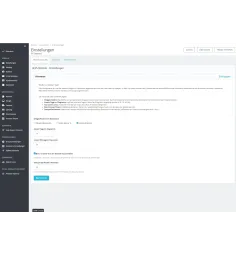
  • Settings – widget position, chart range, top-lists limit, bot filter, dedupe window.
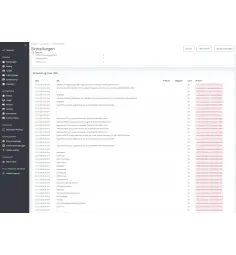
  • Analysis – time range evaluation with date + time, top lists and a detailed log.
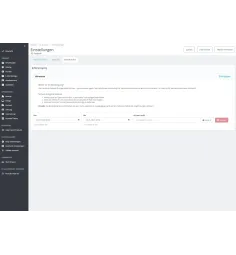
  • Cleanup – delete your own tests precisely by time range + IP hash (md5).

It also includes a self-heal function: if hooks were removed by accident (e.g., manual DB edits), they are automatically repaired when opening the module in the Back Office.


Feature overview

  • Visitor line chart for the last X days (freely configurable, e.g., 7 / 30 / 90 days).
  • Compact key totals: Today, Yesterday, last 7 days, plus overall totals.
  • Top URLs / Top pages: which targets/URLs are visited most.
  • Top products: most visited products (name shown when available, otherwise ID fallback).
  • Top categories: most visited categories (name shown when available, otherwise ID fallback).
  • Top countries: based on ISO country codes (e.g., DE, AT, CH).
  • Analysis time range filter with date + time (minute-level precision).
  • Product & category autocomplete in the Analysis tab (type, select, evaluate).
  • Detailed log with timestamp, target URL, country and IP hash (no plain IP stored).
  • Bot/crawler filtering (optional) – hide typical bots and preview tools.
  • Dedupe time window (minutes) – optionally merge repeated hits by the same visitor per page (0 = off).
  • Filtering of technical requests (assets, API, system/admin routes, tools, importers, etc.).
  • No tracking of sensitive areas (login, account, checkout, order history, etc. – depending on configuration/filters).
  • Cleanup by time range + IP hash – perfect to remove your own test traffic.

Technical highlights

  • Designed for PrestaShop 1.7.7.x – 9.x (future-ready).
  • Compatible with PHP 7.4 – PHP 8.4 (recommended PHP 8.1+).
  • Clean integration via PrestaShop hooks (front controller + admin dashboard).
  • No front-office template changes required – runs in the background.
  • Dashboard chart using Chartist.js (compact and fast for BO usage).
  • Data minimization: no plain IP is stored; an md5 hash is used to identify test traffic and allow precise cleanup.
  • Multi-shop ready – operates in the active shop context.
  • Optional GeoIP mapping via local MaxMind GeoLite2-Country database (if enabled/configured).

Who is PS-Statistics Pro for?

  • Merchants who want simple, understandable visitor stats directly in Back Office.
  • Projects where privacy and data minimization matter.
  • Shop owners who prefer no external analytics services.
  • Agencies looking for a low-maintenance analytics add-on for clients.

Package & Installation

  • PrestaShop module as an installable ZIP file (upload via Back Office).
  • Built-in settings page:
    • Widget position in the dashboard (top / Zone 1 / Zone 2)
    • Number of days displayed in the chart
    • Top-lists limit
    • Bot/crawler filtering (optional)
    • Dedupe window in minutes (0 = off)
  • Analysis tab with date+time range filter, top lists and detailed log.
  • Cleanup tab to remove test data (time range + IP hash).
  • Languages: German & English.
  • 12 months of updates & email support (bug fixes & compatibility).

Technical data (quick overview)

Product type PrestaShop module
Use case / category Visitor analytics, shop analysis, privacy-friendly tracking
Platform PrestaShop 1.7.7.x – 9.x
Technology PHP, MySQL/MariaDB, PrestaShop framework, Smarty, Chartist.js
PHP version PHP 7.4 – 8.4 (recommended: PHP 8.1+)
Database Dedicated table psstatistik, storing date/time, target URL, country (ISO code), IP hash (md5)
Multi-shop / multi-domain Multi-shop capable, runs in the active shop context
GDPR relevance No personal data, no cookies – data-minimized analytics solution*
Support Email support, updates as needed (bug fixes & compatibility)

Conclusion

PS-Statistics Pro is the ideal solution if you want clear, privacy-friendly visitor analytics directly inside the PrestaShop dashboard. Track trends, identify your most visited pages, products and categories, and see where visitors come from — without external services and without complex setup.

*Note: This module is designed to minimize data and does not store personal data. A binding legal assessment for your specific use case can only be provided by qualified legal counsel.

Data sheet

Produkt-Typ
PrestaShop Modul
Einsatzzweck / Kategorie
Statistik & Reporting
Zielgruppe
Shopbetreiber
Schwierigkeitsgrad
Anfängerfreundlich
Plattform
PS 1.7.7.x – 9.x (Future-Ready)
Programmiersprache / Technologie
PHP + PrestaShop Framework
Datenbank / Storage
Verwendet eigene Tabellen
Installationsart
PrestaShop-Modul (ZIP, im BO installierbar)
Aktivierung / Lizenzierung
Keine Aktivierung nötig
Multi-Shop / Multi-Domain-Support
Multi-Shop / Multi-Domain unterstützt
Support-Kanal
E-Mail-Support
Support-Dauer ab Kauf
12 Monate
Update-Intervall (geplant)
Nach Bedarf (Bugfixes / Kompatibilität)
Dokumentation verfügbar
Integrierte Hilfetexte im Modul
DSGVO-Relevanz
Kein Personenbezug
Logging & Debug
Basis-Logging (Fehler / Aktionen)
psstatistk